The idea of hearing your favorite artist tackle an unexpected genre or a beloved character belt out a chart-topping hit used to be the stuff of fan fiction. Not anymore. With the rapid evolution of artificial intelligence, creating AI song covers, where you replace original song vocals with another artist's, character's, or even a politician's voice, is not only possible but increasingly accessible. This guide will walk you through How to Create AI Song Covers: A Step-by-Step Guide, offering a comprehensive, trustworthy, and human approach to navigating this exciting, yet complex, new frontier of music creation.
Ready to dive into the future of sound? Let's get started.
At a Glance: Key Takeaways for AI Song Covers
- Legality First: Understand that while a voice isn't copyrightable, a celebrity's "right of publicity" protects their identity. Using copyrighted lyrics, especially for public or monetized content, is a legal grey zone with risks.
- Original Lyrics for Public Use: If you plan to share or monetize, always use original lyrics inspired by the song's themes, not direct copies.
- Tool Variety: Choose between free desktop apps like Replay for detailed control or web-based services like Voicify, Covers AI, or Kits AI for convenience and diverse voice models.
- System Matters: Desktop apps, particularly Replay, benefit greatly from a robust CPU or dedicated GPU for faster processing.
- Workflow Essentials: The core process involves selecting a concept, preparing lyrics, crafting a style prompt, generating the song, and refining it.
- Quality Exports: Opt for WAV files for the highest audio fidelity, especially if you plan further mixing or public uploads.
- Future-Proof Your Content: For sustainable AI music creation, aim to transition towards original compositions rather than solely relying on covers of copyrighted material.
The AI Voice Phenomenon: What You Need to Know
AI voice synthesis has leaped from sci-fi to our sound systems, making it possible to transpose voices onto existing tracks or generate entirely new vocal performances. At its heart, an AI song cover replaces the original singer's voice with an AI-generated voice trained on another individual's vocal patterns. This technology opens up a world of creative possibilities, from humorous parodies to genuine musical experiments.
However, with great power comes great responsibility – and some significant legal questions.
Navigating the Legal Landscape: Rights, Risks, and Recommendations
Before you even think about uploading that Drake-singing-opera track to YouTube, it's crucial to understand the legal nuances surrounding AI song covers. This isn't just about avoiding a slap on the wrist; it's about respecting artists' rights and safeguarding your own creative endeavors.
Voice vs. Identity: The Right of Publicity
Here's the often-misunderstood distinction: a voice itself is not typically copyrightable. However, a celebrity's right of publicity is a powerful legal shield. This right protects an individual's identity, name, likeness, and in many jurisdictions, their distinct vocal characteristics, from commercial exploitation without their explicit consent. Using a famous artist's AI voice model could be seen as infringing on this right, especially if your intention is commercial.
The Takeaway: While you might find AI models of famous voices, using them for public or monetized content carries inherent risks regarding personality rights.
The "Grey Zone" of Copyrighted Lyrics
This is where things get particularly tricky. Most AI song covers rely on the lyrics of existing, copyrighted songs. Currently, many channels creating AI covers monetize this content, but experts widely agree this situation is temporary and unstable.
YouTube, for instance, has sophisticated content ID systems. Record labels and original rights holders can (and do) issue copyright claims. These claims can divert all revenue from your video to the rights holder, or worse, result in strikes against your channel. Multiple strikes can lead to video removal, monetization disablement, or even channel termination.
Critical Recommendation for Public/Monetized Uploads:
To minimize legal risk and build a sustainable presence:
DO NOT directly copy copyrighted lyrics.
Instead, write original lyrics inspired by the themes, mood, and topic of the original song. Think of it as a stylistic homage, not a direct recreation. AI tools can even help you generate new lyrics based on a prompt like, "Write original lyrics inspired by the themes of jealousy and heartbreak, in the style of a mid-2000s indie rock track, but don’t copy any lines or phrases from ‘Mr. Brightside.’"
For Personal Listening & Experimentation:
If your AI cover is purely for personal enjoyment, private sharing with friends, or experimentation, using copyrighted lyrics carries far less risk. Just avoid uploading it publicly or using it commercially.
The Evolving Landscape of AI & Copyright
The legal framework around AI-generated content is rapidly evolving. What's permissible today might not be tomorrow. Always proceed with caution and prioritize original creation, especially if you aim for longevity in the AI music space.
Essential Tools for Creating AI Song Covers
The good news? The tools to create AI song covers are becoming more powerful and user-friendly by the day. Whether you prefer a desktop application for more control or a web-based service for convenience, there's an option for you. Many creators leverage a platform like Our AI song cover generator or others mentioned below for their projects.
Let's explore the leading contenders:
Desktop Powerhouse: Replay (Free for PC/Mac)
Replay stands out as a robust, free desktop application designed for creating AI vocal covers. It offers a wide array of AI vocal models, including many from famous artists and even non-singers.
Key Features:
- Vast Voice Library: Access models from artists like 21 Savage, Drake, Kanye West, Britney Spears, Freddie Mercury, and more.
- Offline Processing: Once models are downloaded, much of the heavy lifting happens on your machine.
- Wide Audio Support: Handles numerous formats (MP3, WAV, FLAC, M4A, YouTube URLs, etc.).
System Requirements (Important!): - Operating System: PC or Mac.
- Storage: 1GB+ hard drive space for AI models.
- RAM: 8GB RAM (16GB+ recommended for smoother operation).
- Processing Power: A dedicated GPU significantly speeds up generation. If no GPU, a powerful CPU is essential.
- Why No Mobile? Mobile devices simply lack the raw processing power required for complex AI model inference.
Convenient Web-Based AI Song Cover Tools
If you prefer not to install desktop software or need access on the go (for some), these web-based platforms offer compelling alternatives, often with free tiers or credit systems to get you started.
1. Voicify
Voicify boasts thousands of vocal options, spanning rappers, singers, fictional characters, and historical figures. It's adept at handling vocal/instrumental splitting, a crucial step for clean AI covers.
- Model Variety: Extensive library of AI voices.
- Built-in Splitting: Streamlines the process by separating vocals from instrumentals.
- Pricing: Not free, operates on credit-based plans starting with 25 credits/month, with options for custom voice models.
2. Covers AI
This platform offers a straightforward approach: input a YouTube URL, select from a range of novelty AI voices (think Marge Simpson or Vladimir Putin), and let it generate.
- Simplicity: User-friendly interface, ideal for quick covers.
- Novelty Voices: Focus on fun, recognizable character voices.
- Pricing: Subscription-based. The lowest tier provides unlimited AI covers from 300 voices. Premium plans allow for training custom AI voice models.
3. Voicedub AI
Voicedub AI provides a tiered subscription model, offering a balance of features and flexibility, including mobile compatibility for some tiers.
- Tiered Plans: Basic plan includes 5 AI song covers/month and 1 voice clone. Higher tiers expand cover limits and custom voice model capabilities.
- Mobile Compatibility: Higher tiers offer Android/iPhone/iPad compatibility, which is rare for such demanding tasks.
4. Kits AI
Kits AI focuses heavily on the ability to train custom AI voice models, either from your own vocal tracks or YouTube videos. This makes it excellent for creators looking to develop their own unique AI singing persona or for professional music production.
- Custom Voice Training: A standout feature for personalized AI voices.
- Free Tier: Offers 15 AI song cover creations per month using its built-in artist voices (note: these are generally not famous artists but high-quality professional voices).
- Best For: Creating original music with professional voices or cloning your own voice for endless vocal experimentation.
The Core Workflow: Creating Your AI Song Cover, Step-by-Step
Regardless of the tool you choose, the fundamental process for crafting a compelling AI song cover remains consistent. Think of this as your blueprint.
Step 1: Concept Selection — Dream Big (But Smart)
Before you touch any software, settle on your creative vision.
- Choose Your Original Song: Pick a well-known track. Familiarity makes the AI cover more impactful, whether it's for humor or genuine musical exploration.
- Define Your Target Genre/Voice: How do you want to reinterpret it? Do you want "Mr. Brightside" as a deep house remix? Or a classic opera aria as a heavy metal scream? Be specific. This clarity will guide all subsequent steps.
Step 2: Lyrics Preparation — Mind the Law!
This is where your legal diligence comes into play.
- For Public/Monetized Uploads: As discussed, write original lyrics. Use AI tools to help generate new lines inspired by the original's themes, emotional core, and narrative, but without copying any direct phrases or lines.
- Example Prompt: "Write original lyrics about overcoming doubt and finding inner strength, in the style of a motivational pop anthem. Do not copy any lines from 'Eye of the Tiger.'"
- Structure Your Lyrics: AI music generators perform best with clearly structured lyrics. Use standard song section headers:
[Intro]
(Instrumental flourish)
[Verse 1]
In shadows deep, a whisper soft
A fragile hope, oft carried aloft
[Pre-Chorus]
The silent fears, they start to fade
As courage blooms, a bold parade
[Chorus]
Rise above, let your spirit gleam
Live the power, fulfill the dream!
[Bridge]
Through stormy nights, a guiding star
You are stronger than you think you are
[Chorus x2]
Rise above, let your spirit gleam
Live the power, fulfill the dream!
[Outro]
(Fade out with uplifting harmonies)
This structure helps the AI understand the flow and energy changes of a typical song.
Step 3: Style Prompt Creation — Guiding the AI Maestro
The style prompt is your instruction manual for the AI. It dictates the musical genre, mood, tempo, and even production qualities. The more descriptive and accurate, the better your results.
- Key Elements to Include:
- Genre & Sub-genre: "Deep house remix," "1950s soul ballad," "drum & bass roller," "synthwave anthem."
- BPM / Mood: "125 BPM, energetic, club-ready, uplifting but emotional," or "60 BPM, melancholic, reflective, atmospheric."
- Vocal Character: "Male vocal, warm tone, slightly raspy, confident delivery," or "Female vocal, ethereal, soaring, operatic."
- Production Cues: "Punchy side-chained bass, clean hi-hats, wide pads, atmospheric reverb," "Driving guitar riffs, heavy drums, growling bassline," "Lush strings, delicate piano, sparse percussion."
- Keep it Concise & Consistent: Avoid contradictory instructions. "Heavy metal acoustic folk ballad" might confuse the AI.
Step 4: Song Generation — Let the AI Do Its Magic
Now, you'll feed your prepared lyrics and style prompt into your chosen AI song generation tool (e.g., Replay, Voicify, or a Suno-powered generator).
- Paste Lyrics & Prompt: Input your structured lyrics and carefully crafted style prompt.
- Select Voice Type: Choose a general voice type (e.g., male, female, specific artist model if allowed).
- Adjust Advanced Settings (if available):
- Randomness / Creativity: This setting influences how much the AI deviates from your prompt. A value of 10-15% is often recommended for balanced results. Higher values create more unpredictable (and sometimes wild) outcomes, while lower values stick very closely to your input, potentially sounding rigid.
- Style Influence: Often found around 80-85%. This controls how much the AI adheres to the specified musical style. If the output sounds too stiff or generic, try lowering this slightly to give the AI more creative freedom.
- Give a Working Title: A simple title helps you organize your generated tracks.
- Click "Generate Song": Most tools will offer two or more versions for you to choose from.
Step 5: Review and Iterate — The Human Touch
This is where your ear becomes the most important tool.
- Listen Critically: Use quality headphones or speakers. Don't just hear it; listen to it.
- Assess Against Your Concept: Does it match your target genre? Does the AI vocal blend well with the generated instrumental? Is the energy consistent throughout the track?
- Identify Areas for Improvement:
- If the style is off, tweak your style prompt.
- If the vocals sound too robotic or too wild, adjust the randomness/style influence.
- Experiment with different voice types.
- Regenerate: Don't be afraid to go back to Step 3 or 4 and regenerate until you're satisfied. Iteration is key to refining AI-generated content.
Step 6: Export and Download — Ready for the World (or Your Ears)
Once you have a version you're happy with, it's time to export.
- WAV File (Recommended): This offers the highest audio quality (uncompressed). Always choose WAV for public uploads, further mixing, or mastering.
- MP3: Good for quick sharing, drafts, or when file size is a concern.
- Instrumental Only / Vocals Only: Many tools offer these options. They're invaluable for remixing, adding live instruments, or creating karaoke versions.
- Subtitles / Lyrics File: Essential for creating karaoke-style videos or syncing lyrics in a video editor.
- Auto-Generated Video: Some tools provide a basic video. While convenient for quick YouTube uploads, custom visuals always offer more creativity and polish.
Specific Steps for Replay (A Deep Dive for the Free Desktop App)
If you've opted for the powerful and free Replay desktop app, here's a detailed walkthrough:
- Install Replay: Download and install the application on your PC or Mac from their official source.
- Prepare Your Source Audio: Get the audio file of the song you want to transform (MP3, WAV, etc.) ready on your computer, or copy its YouTube URL.
- Open Replay & Initial Setup: Launch Replay. The first time, it will likely prompt you to download necessary AI model files. Ensure you have at least 1GB of free hard drive space.
- Add Your Song:
- Click "Select or drop audio here" to browse for your local audio file.
- Alternatively, paste a YouTube URL directly into the input field. Replay will handle the audio extraction.
- Select & Download a Vocal Model:
- Browse the available vocal models, often categorized (e.g., "Musician," "Other").
- Click on the desired model (e.g., "Freddie Mercury," "Britney Spears").
- Replay will then download this specific AI voice model to your system. This takes some time and storage.
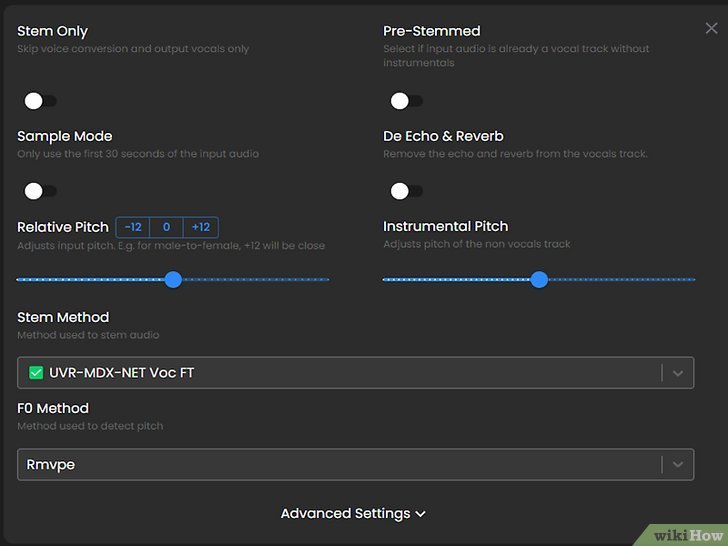
- Choose Your Settings:
- Default Settings: For most users, the default settings work well to start.
- Sample Mode: If you just want a quick preview, select "Sample Mode" to generate a 30-second cover.
- Advanced Settings (for power users):
- Processor: If you have a dedicated GPU, select "GPU" for significantly faster processing. Otherwise, leave it on "CPU."
- Output Format: Choose your desired output (e.g., MP3 for quick sharing, WAV for quality).
- Click "Create Song": Initiate the generation process. Be patient; this is processor-intensive. Avoid running other demanding applications simultaneously to ensure a smooth, fast generation.
- Review, Share, or Save:
- Listen: Click "Play" to hear your newly generated AI cover.
- Share: Use the "link" icon to generate a shareable web link if you want to send it to friends.
- Save: Click the three-dot menu and select "Save to Downloads" (or a similar option) to store the audio file on your computer.
Beyond the Cover: Next Steps & The Future of AI Music
Mastering the creation of AI song covers is just the beginning. The skills you develop in prompt engineering, audio manipulation, and creative iteration will serve you well as you explore the broader landscape of AI-generated music.
Enhancing Your AI Music Projects
- Visuals Matter: Once you have a compelling AI song, consider creating AI-generated album covers or simple music videos. Tools like Midjourney, DALL-E, or Stable Diffusion can help you craft stunning visuals that match the mood of your track. Combine these with basic video editing software for polished YouTube uploads.
- Original Compositions: As you gain proficiency, challenge yourself to create entirely original songs with AI assistance. Use AI to generate melodies, harmonies, and even full instrumental tracks from scratch. This moves you away from the legal grey zone of covers and into a realm of pure, unadulterated creativity.
The Long-Term Vision for AI Music Channels
The sustainable strategy for anyone looking to build a presence in AI music content involves a transition:
- From Covers to Originals: Shift from relying on covers of copyrighted lyrics to creating original songs with AI assistance. This not only mitigates copyright risks but also allows you to develop a unique artistic voice and brand.
- Embrace Hybrid Workflows: Combine AI-generated elements with your own human creativity. Perhaps you write the lyrics, AI generates the instrumental, and you refine the vocal performance. The most exciting music will likely come from this collaborative approach between human and machine.
The world of AI music is evolving at lightning speed. By understanding the tools, respecting the legal boundaries, and embracing an iterative, creative process, you're well-equipped to contribute to this exciting new chapter in sound. Go forth and create!